OsmAnd 5.3 (iOS)

OsmAnd 5.3 for iOS — Now Available!
Get ready to explore a new dimension. This update brings the highly anticipated 3D Buildings and Globe View to your iPhone, alongside a massive overhaul of the Trip Recording widgets. Whether you're navigating city skyscrapers or planning a transcontinental journey, version 5.3 offers more perspective and precision than ever before.
What's new
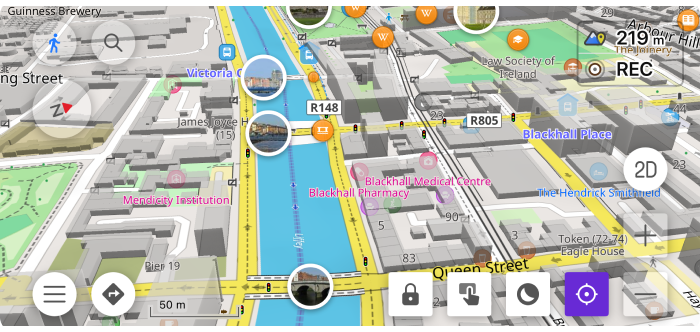
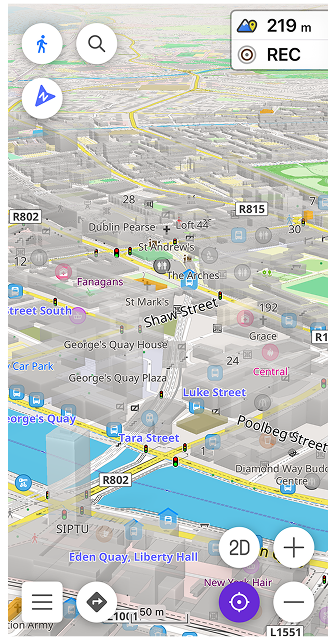
- 3D buildings with volumetric models and new selection/highlighting functionality;
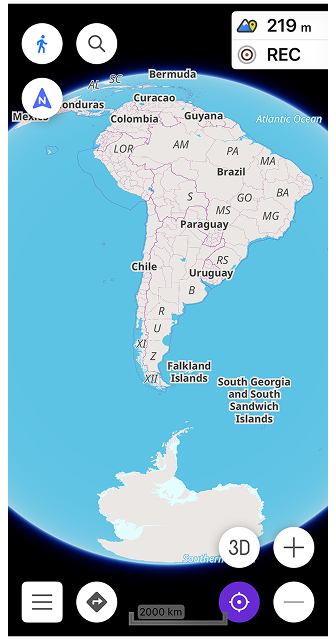
- Globe view allowing you to display the map as a spherical Earth;
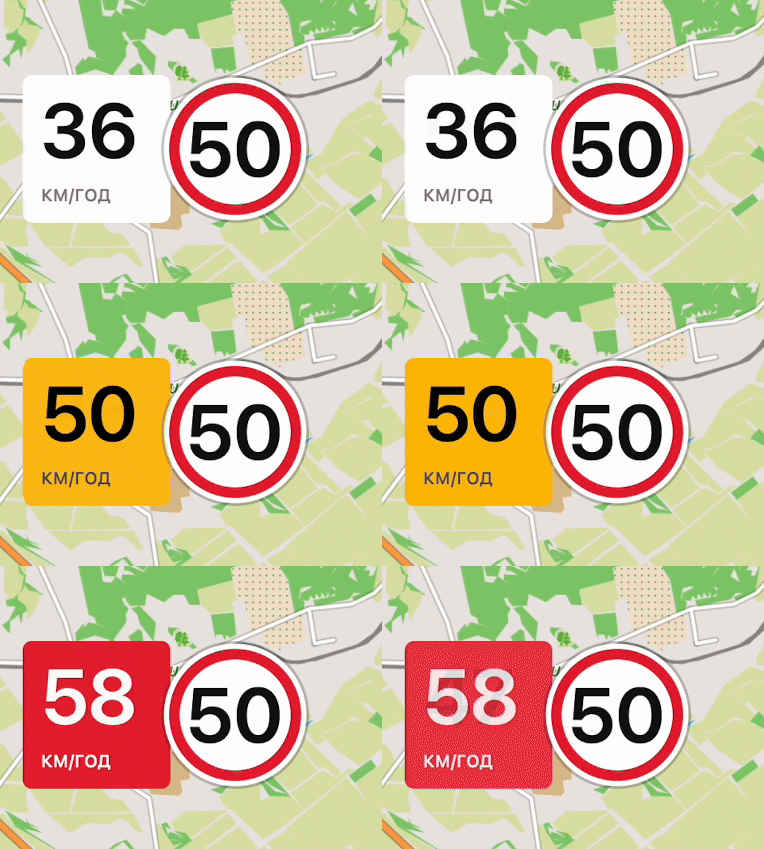
- Introduced visual speeding indication to the Speedometer widget with tolerance warning and limit-exceed states;
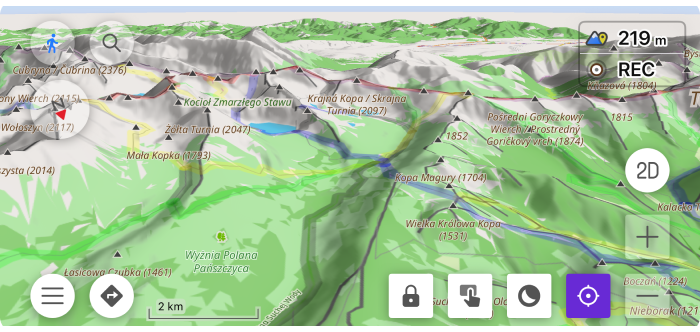
- Visibility and appearance controls are available for map buttons;
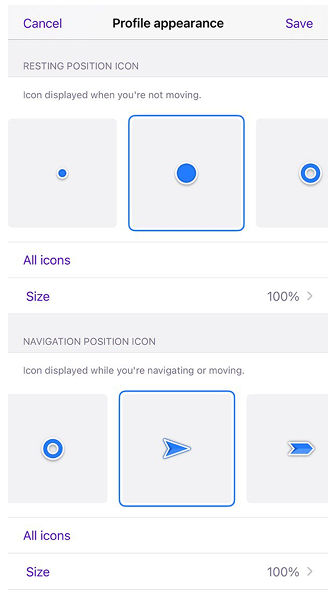
- Position icon size can now be adjusted independently for Resting and Navigation modes;
- New Trip Recording Widgets: Max Speed and Average Slope; improved Uphill/Downhill;
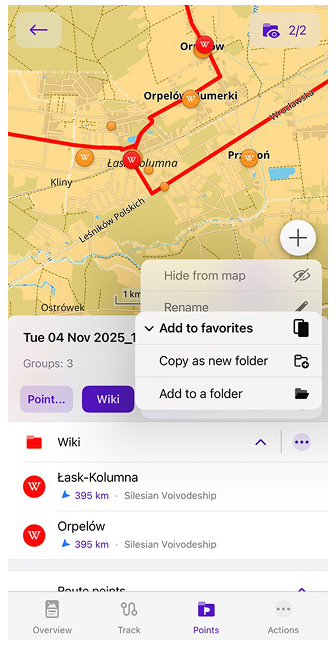
- Merge waypoints into a Favorites folder;
- Added sharing link to any POI;
- CarPlay Enhancements;
- Improved connectivity for paired OBD-II adapters;
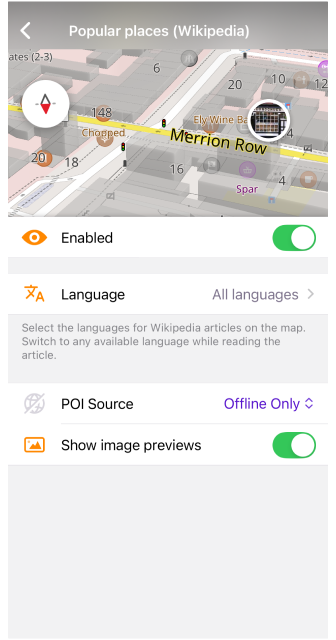
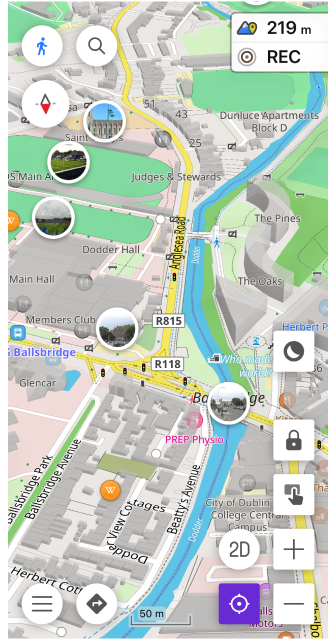
- Popular places layer updated with POI source selection and optional image previews on the map;
- Other improvements and optimizations, including redesigned graph axis selection and enhanced search results;
- Bug fixes.
Globe View
Globe View allows you to display the map as a spherical Earth instead of a flat projection. This mode changes the geometry of the map surface and adapts map interaction to spherical navigation, providing a more realistic perspective for long-distance browsing.
Configure map → Topography → Globe View
3D Buildings
3D Buildings feature displays buildings as volumetric 3D models instead of flat shapes.
Configure map → Topography → 3D Buildings
Speedometer Widget
Speedometer widget now shows visual speeding alerts with color-coded tolerance and limit-exceed states, including animated transitions when crossing speed thresholds.
Map Buttons: Visibility & Appearance
Map buttons can now be fully customized. You can control the visibility and adjust the appearance of both default and custom (Quick Action) buttons.
Adjustable Position Icon Size
You can now resize the My Location position icon independently from the app’s text size. Separate size settings are available for Resting and Navigation modes, allowing better visibility while driving. The icon size can be adjusted from 50% to 300%, with 100% set as default.
New Trip Recording Widgets
The Trip Recording plugin has been expanded with smarter widgets that provide deeper insights into your activity, especially for cycling and hiking in hilly terrain.
Multiple Display Modes
Many Trip Recording widgets now support Multiple Display Modes. This allows you to toggle a single widget to show metrics for your overall trip or specifically for your Last Uphill or Last Downhill section. You can switch modes by tapping the widget or via the widget settings.
Max Speed Widget
The Max Speed widget displays your peak speed. In its new modes, you can see exactly how fast you went during your most recent descent or climb, helping you analyze performance on specific segments of your track.

Average Slope Widget
The Average Slope widget provides real-time data on the steepness of your current or last completed section. It’s an essential tool for gauging the difficulty of a climb or the intensity of a descent.

Moving Time Widget
The Moving Time widget now tracks your active duration with higher granularity. By switching modes, you can see exactly how much time you spent on your last uphill grind versus your last downhill cruise.

Updates copying Waypoints
Added option to copy waypoints between different Favorites folders or create new ones.
Share Link to any POI
You can now quickly share a link to any Point of Interest (POI) or custom map location. When you select an object on the map, the Share action generates a universal osmand.net URL.
This link can be opened by other OsmAnd users to find the exact location on their devices, or viewed in a web browser.
Weather Quick Actions
New quick actions make it easier to control weather layers directly from the map. Show/Hide – Weather layers works as a master toggle for all active weather layers. When turned off, it hides all currently enabled weather layers. When turned on again, it restores exactly the same set of layers that were active before. Show/Hide – Wind animation allows you to quickly enable or disable the wind animation layer independently.
CarPlay Enhancements
This update brings a more stable and feature-rich experience to your vehicle’s display, addressing key community requests for map appearance and post-arrival actions.
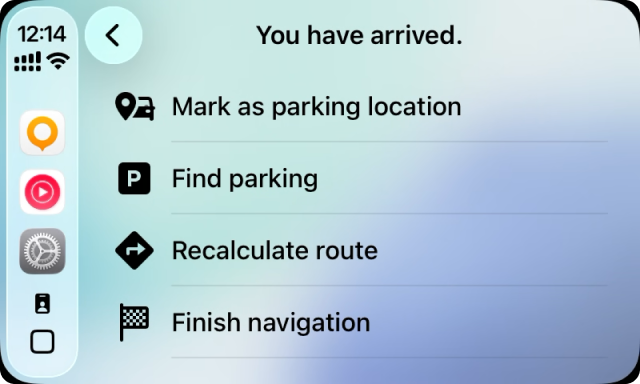
New "You Have Arrived" Dialog
When you reach your destination, CarPlay now displays a redesigned post-navigation screen. Instead of simply ending the trip, you are presented with several convenient actions:
- Mark as parking position: Save your current location as a parking spot for easy return later.
- Find Parking: Instantly search for nearby parking lots.
- Recalculate route: Useful if you need to adjust your route at the last moment.
- Finish navigation: Complete the trip and return to the main map.
Enhanced Map Controls
- Always Show Dark Map: You can now force the map to stay in Dark Mode regardless of your car's headlight status or the time of day. This is a highly requested feature for drivers who prefer high-contrast navigation at all times.
- Smoother Location Icon: The "My Location" cursor now moves more fluidly across the screen, providing a more natural and precise representation of your vehicle's position.
- Dashboard Stability: We've resolved an issue where the map could become unresponsive when viewed in the CarPlay Dashboard (multi-window) mode.
Improved OBD-II Connectivity
For users who monitor their vehicle's health and performance in real-time, we have significantly improved the connectivity for paired OBD-II adapters.
This update focuses on the stability of the Bluetooth Low Energy (BLE) link between your iOS device and the adapter. The connection is now more resilient to interruptions, ensuring a steady flow of data—such as engine RPM, speed, and fuel consumption—directly into your OsmAnd widgets and GPX logs.
- Faster Reconnection: The app now reconnects more reliably when you return to your vehicle.
- Data Accuracy: Improved handling of sensor data packets reduces "frozen" values in your dashboard widgets.
Popular Places
The Popular Places layer has been significantly updated to provide more control over how you discover points of interest. This feature helps you find the most notable locations in an area, now with improved data source management and visual previews.
Configure map → Show on map → Popular places (Wikipedia)
POI Source Selection
You can now choose between Online and Offline sources for Popular Places.
- Online: Fetches the most up-to-date popularity data from OsmAnd servers.
- Offline: Uses data stored within your downloaded Wikipedia maps, allowing you to discover top sites even without an internet connection.
Image Previews on Map
To make the map more interactive, you can now enable image previews. When this option is toggled on, small thumbnails from Wikipedia appear directly on the map for top-rated locations. This helps you visually identify landmarks and decide where to head next without needing to open the full POI description.
Unsupported Maps Management
The Updates tab now detects unsupported and overlapping region maps. If a map has been deprecated and replaced by smaller regional maps, it appears under a new Unsupported maps section. You can review the list, remove outdated maps individually or use Delete all to clean them up at once (with confirmation). Large overlapping region maps are hidden to prevent duplication and confusion, helping keep your map data organized and up to date.
Other Improvements
- Redesigned Graph Axis Selection The "Analyze on map" graph now includes a redesigned axis selection menu. The new interface allows configuring both the X-axis and Y-axis in a single sheet and supports selecting up to two data types for the Y-axis. Additional data sources such as external sensors and vehicle metrics (OBD-II) are now available when present in the track data, making it easier to analyse different aspects of a recorded track.
- Enhanced Search Result Details POI search results have been improved with a more consistent city display, optional thumbnails, and a refined layout to help you identify locations at a glance.
- Improved Trail and Route Interaction We’ve refined how the map handles taps on trails and hiking/cycling routes. This update ensures that selecting a route directly from the map consistently opens the correct details and highlights the entire path, fixing previous issues where the selection would fail or become unresponsive. Route shields for specialized activities—including fitness, running, and canoe routes — are now fully interactive.
- "Distance by Tap" Refinement Improved the "Distance by tap" tool to prevent the ruler from accidentally appearing or changing state while you are swiping or moving the map. The tool now correctly distinguishes between a deliberate tap to measure distance and general map navigation.
- Widget Icon Visibility Added a new option to show or hide icon on widgets. This allows for a cleaner, more minimalist dashboard by displaying only data, which is especially useful for medium and large widget layouts.
Bug fixes
- Fixed ETA not updating in Navigation widgets while the vehicle is stationary;
- Fixed map behavior for trails/routes opening on the map;
- Fixed wrong language displayed in Wikipedia POI details;
- Fixed broken UI and corrupted X-axis scale in "Analyze on Map" for segments;
- Fixed crash during navigation by track with or without "Snap to road" enabled;
- Fixed Selection Pin offset when selecting a point from the "What's here" menu;
- Fixed CarPlay: Next turn widget background unexpectedly turning red during navigation;
- Fixed 3D map view not being preserved after a route preview;
- Resolved issue where Waypoint and folder icons would disappear after renaming a folder and restarting the app;
- Resolved UI issue where character descenders were cropped in the Next turn widget;
- Resolved issue where temporary GPX files were visible in search results;
- Resolved issue where vehicle parameters did not correctly respect changes to measurement units or region settings;
- Fixed issue where tapping Favorites on the map would fail if the map was rotated;
- Fixed issue where POIs would fail to render if the OSM notes layer was enabled under poor internet connectivity;
- Resolved issue where the POI context menu displayed redundant categories or tags;
- Fixed issue where the customized route line color would not update until the page was refreshed;
- Fixed issue where Bremen was displayed inconsistently compared to other German regions on the map.
If you have suggestions for improving the iOS version of the app, please get in touch with us. We appreciate and welcome your contribution to the further development of OsmAnd.
-
Follow:
Follow OsmAnd on Facebook, TikTok, X (Twitter), Reddit, and Instagram!
-
Join:
Join us at our groups of Telegram (OsmAnd News channel), (EN), (IT), (FR), (DE), (UA), (ES), (BR-PT), (PL), (AR), (TR).
-
Get:
