Star Watcher
This article is incomplete & needs to be reviewed. You can help by creating a pull request.
This feature is currently not available for the iOS version of the OsmAnd app.
Star Watcher est actuellement en bêta.
Aperçu
Le plugin Star Watcher affiche une superposition du ciel étoilé sur la carte avec des étoiles, des constellations, le Soleil, la Lune et les planètes. Les positions et les trajectoires du Soleil, de la Lune, des planètes et des principales étoiles sont affichées sur la carte.
Paramètres de configuration requis
Les paramètres de configuration suivants sont requis pour afficher la superposition Star Watcher :
- Activez le plugin Star Watcher dans la section Plugins du Menu principal
- Utilisez Menu → Carte des étoiles pour ouvrir l'écran dédié avec le ciel étoilé, les paramètres et les contrôles de temps
- Sélectionnez l'heure et la date à l'aide des curseurs ou des boutons sur l'écran Carte des étoiles
- Ajustez la visibilité et la transparence dans les paramètres du menu « Carte des étoiles ».
Le plugin fonctionne avec les deux moteurs de rendu de carte mais performe le mieux en mode OpenGL.
Écran Carte des étoiles
Aller à : Plugin activé → Menu → Carte des étoiles
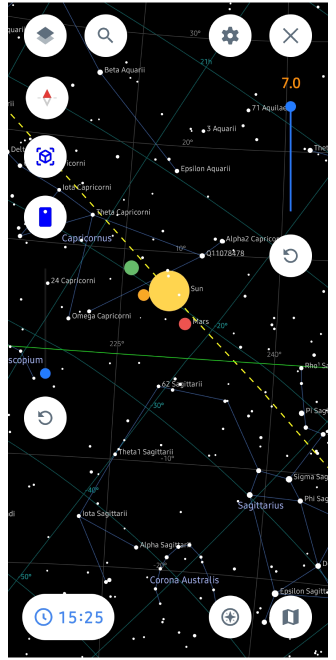
L'écran dédié Carte des étoiles affiche un dôme céleste interactif avec des étoiles, des constellations, des planètes, des trajectoires du Soleil et de la Lune. En bas se trouve une barre d'outils avec des curseurs heure/date, des boutons jour et des bascules rapides pour les couches comme la ligne d'horizon ou les étiquettes.
- L'écran rend l'hémisphère céleste complet au-dessus de votre emplacement, aligné avec la direction de la boussole
- Appuyez sur les objets célestes pour des détails comme la magnitude, les heures de lever/coucher ou les trajectoires
Informations sur les objets célestes
Appuyez sur n'importe quelle étoile, planète, constellation, ou Soleil/Lune sur l'écran Carte des étoiles ou la superposition sur la carte pour voir des informations détaillées.
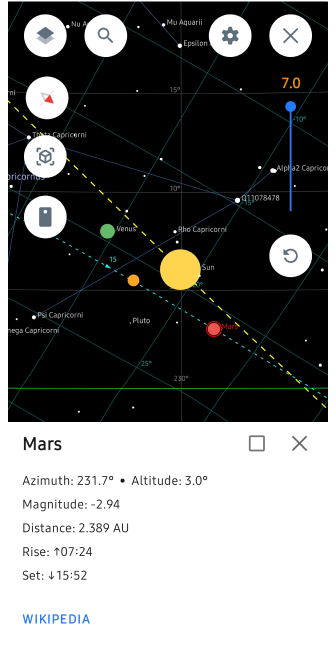
Données affichées :
- Azimut : Direction par rapport au Nord (0°-360°) où l'objet apparaît dans le ciel
- Altitude : Hauteur au-dessus de l'horizon (0° à l'horizon, 90° au zénith)
- Magnitude : Échelle de luminosité (-26 pour le Soleil à +6 pour les étoiles faibles ; plus bas = plus lumineux)
- Heures de lever/coucher : Quand l'objet se lève au-dessus/se couche sous l'horizon
- Distance (planètes) : Distance moyenne de la Terre en UA/km
Intégration Wikipedia : Appuyez sur « Wikipedia » dans la pop-up d'informations pour ouvrir la page de l'objet dans votre navigateur (par ex. Sirius, Orion, Vénus). Fonctionne hors ligne pour les données mises en cache, en ligne pour les articles complets.
Appui long sur les objets célestes pour les épingler en tant que marqueurs sur la carte avec des mises à jour de position en direct, ou partager les coordonnées pour l'observation d'étoiles en groupe.
Cette fonctionnalité aide à identifier les objets dans le vrai ciel, à planifier des observations et à apprendre des faits d'astronomie directement depuis OsmAnd.
Recherche d'étoiles AR (Mode Caméra)
Aller à : Plugin activé → Menu → Carte des étoiles → Bouton Caméra
La couche Star Watcher fonctionne avec la caméra de votre appareil pour activer l'observation des étoiles en réalité augmentée (AR). Pointez la caméra de votre téléphone vers le vrai ciel nocturne et voyez des étoiles, des planètes, des constellations, Soleil/Lune superposés en temps réel.
Comment fonctionne la recherche d'étoiles AR :
- Vue caméra en direct montre le vrai ciel avec des superpositions astronomiques transparentes alignées sur l'horizon/boussole
- Déplacez la caméra pour scanner le ciel — les objets se mettent en surbrillance quand ils apparaissent dans votre champ de vision
- Appuyez sur les objets surlignés pour voir l'azimut, l'altitude, la magnitude, les heures de lever/coucher et le lien Wikipedia
- Calibration de la boussole requise pour un alignement précis (agitez le téléphone en figure de 8 si nécessaire)
Parfait pour :
- Identifier des étoiles/planètes faibles invisibles à l'œil nu
- Localiser des constellations en déplaçant le téléphone à travers le ciel
- Navigation céleste en temps réel pendant les randonnées ou le camping
Paramètres Star Watcher
Menu principal → Plugins → Carte des étoiles → Bouton ⚙️
Choisissez les couches et objets visibles
Couches d'étoiles
Toutes les données astronomiques apparaissent comme des superpositions sur la carte, visibles aux échelles de zoom 5-15. Les couches projettent la sphère céleste sur la carte plate.
| Couche | Description |
|---|---|
| Étoiles | Étoiles brillantes (jusqu'à magnitude 4-6) avec étiquettes et lignes de constellations |
| Constellations | Connecte les étoiles en motifs familiers comme Orion ou la Grande Ourse |
| Planètes | Positions et trajectoires quotidiennes pour Mercure-Vénus-Mars-Jupiter-Saturne (icônes colorées) |
| Soleil & Lune | Arcs montrant les heures de lever/coucher et la phase d'illumination |
| Horizon | Ligne séparant le ciel visible du sol, avec directions cardinales |