Weather on the Web
Aperçu
La fonctionnalité Météo sur la Carte Web OsmAnd affiche les conditions météorologiques actuelles et les données de prévision directement sur la carte. Elle fournit un accès aux informations météorologiques provenant de plusieurs sources de prévision, prend en charge le réglage du temps et permet de visualiser des couches météorologiques telles que la température, le vent, la pression, la couverture nuageuse et les précipitations.
Les données météorologiques sont disponibles sans se connecter. La vue Météo peut être ouverte directement depuis l'interface de la carte en cliquant sur l'icône parapluie dans le panneau de menu ou en cliquant avec le bouton droit sur la carte et en sélectionnant Ouvrir la météo dans le menu contextuel.
Source de données
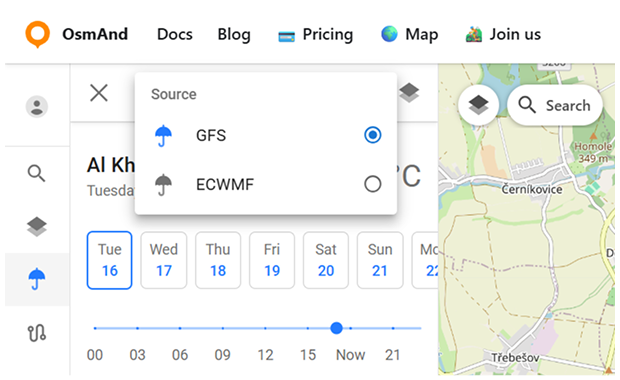
OsmAnd Web fournit des informations météorologiques provenant de deux sources de prévision :
- GFS (Système de prévision globale) – la source par défaut gérée par NOAA/NWS. Fournit des données météorologiques complètes, y compris les couches de température, de pression, d'humidité, de vent et de nuages.
- ECMWF (Centre européen pour les prévisions météorologiques à moyen terme) – une source de prévision alternative. Offre des données de haute qualité sur la température, les précipitations et la pression, mais ne fournit pas d'informations sur le vent ou les nuages.
Pour passer de l'une à l'autre, cliquez sur le bouton parapluie dans le menu Météo.
Menu Météo
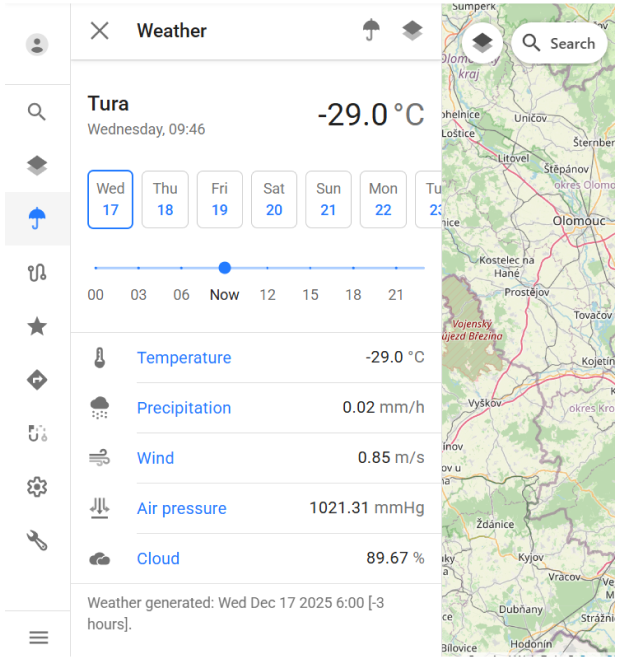
Le menu Météo affiche les conditions météorologiques actuelles et les données de prévision pour l'emplacement sélectionné sur la carte. Il combine une vue d'ensemble, des contrôles de temps et des couches météorologiques dans un seul panneau.
En haut du menu, le nom de l'emplacement actuel, la date, l'heure et la température de l'air sont affichés. En dessous, un sélecteur de jour permet de passer entre les jours de prévision dans la plage disponible.
Un curseur de temps est fourni pour ajuster l'heure de prévision dans le jour sélectionné. Déplacer le curseur met à jour toutes les valeurs météorologiques affichées et les couches de la carte pour refléter le moment choisi.
Le menu affiche les paramètres météorologiques suivants pour l'emplacement sélectionné :
- Température.
- Précipitations.
- Vent.
- Pression atmosphérique.
- Nuages.
Chaque valeur se met à jour dynamiquement lors du changement de l'heure ou de la date de prévision.
En bas du panneau, des informations sur l'heure de génération des données météorologiques sont affichées, indiquant quand les données de prévision ont été mises à jour pour la dernière fois.
Couches météorologiques
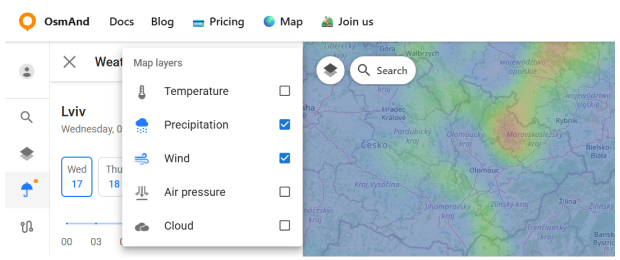
Les couches météorologiques permettent de visualiser les données de prévision directement sur la carte sous forme de superposition. Elles aident à évaluer rapidement les conditions météorologiques sur une zone plus large au lieu de visualiser les valeurs uniquement pour un seul point.
Pour ouvrir le panneau des couches météorologiques, cliquez sur l'icône des couches dans le menu Météo. Cela ouvre une liste des superpositions météorologiques disponibles qui peuvent être activées ou désactivées indépendamment.
Les couches météorologiques suivantes sont disponibles :
- Température — affiche la distribution de la température de l'air sur la carte à l'aide d'un dégradé de couleurs.
- Précipitations — montre l'intensité des précipitations sur la zone sélectionnée.
- Vent — visualise la vitesse et la direction du vent.
- Pression atmosphérique — affiche les motifs de pression atmosphérique.
- Nuages — montre la couverture nuageuse.
Toutes les couches météorologiques sont synchronisées avec la date et l'heure sélectionnées dans le menu Météo. Changer le jour de prévision ou ajuster le curseur de temps met immédiatement à jour les superpositions de la carte pour refléter le moment choisi.
Vue de prévision
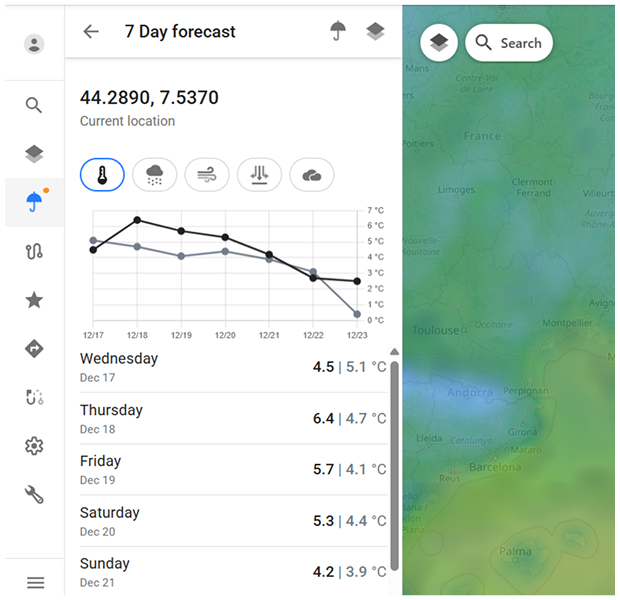
Les prévisions météorologiques sont disponibles jusqu'à 7 jours à l'avance. Les valeurs de prévision sont calculées par intervalles de 3 heures, ce qui vous permet d'examiner les changements à court terme tout au long de chaque jour.
La prévision sur 7 jours est affichée à l'aide de deux formats complémentaires :
- Vue graphique. Montre les tendances de prévision au fil du temps pour le paramètre météorologique sélectionné.
- Vue en liste. Affiche les valeurs de prévision quotidiennes dans un format de liste structuré.
Vous pouvez passer entre différents paramètres météorologiques en utilisant les icônes en haut du panneau de prévision.