Moped routing
Overview
Moped routing allows drivers to build an optimal (fastest) route, taking into account the specifics of driving a vehicle such as a moped or scooter. The routing process considers various factors for safe, comfortable, and legal movement on roads or bicycle paths. The Moped profile avoids high-speed roads: in particular, it does not use motorways and roads where the speed limit is higher than 80 km/h when calculating a route.
By default, Moped profile is deactivated. To use this profile for routing, you need to switch it on in Menu → Settings → App profiles.
Route Parameters - Moped
Moped routing can be configured according to your needs in the Route parameters section of the Navigation settings.
The moped's routing settings are very simple and consist of just a few options.
- Android
- iOS
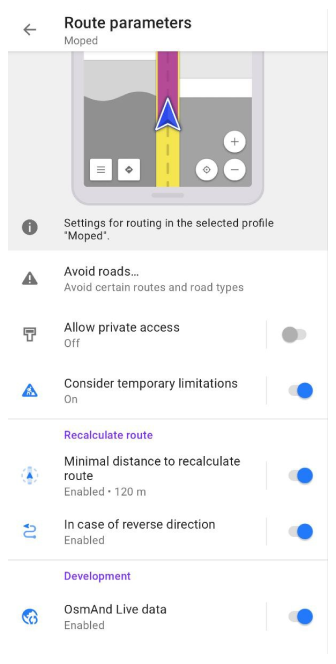
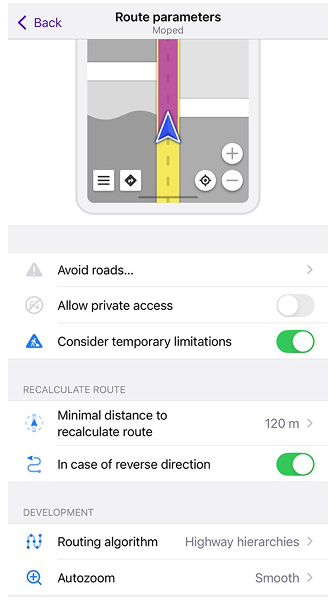
| Parameter | Description | Note |
|---|---|---|
| Avoid roads… | Select roads you want to avoid during navigation.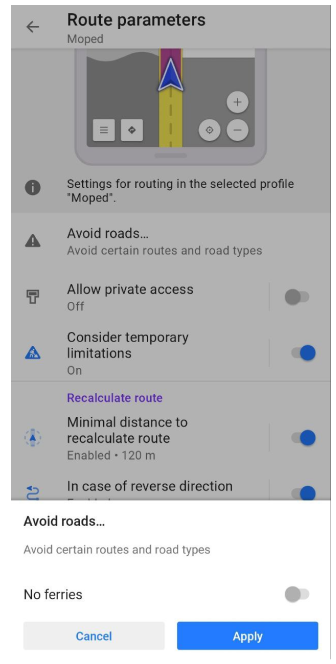 | You can either select a road on the map or choose road type(s) from the list:
|
| Allow private access | Private access restrictions will be ignored when route calculating. | Tag private is used in OSM to describe restrictions on the use of highways and other transportation routes, as well as buildings, entrances, amenities, and leisure entities. |
| Consider temporary limitations | Takes into account temporary restrictions from OpenStreetMap when calculating the route (for example, seasonal closures or construction works). | OSM data may be outdated, so some temporary restrictions may no longer be valid at the time of navigation. |